Why visualize AI PRs
Doesn’t your PR list look like this…?
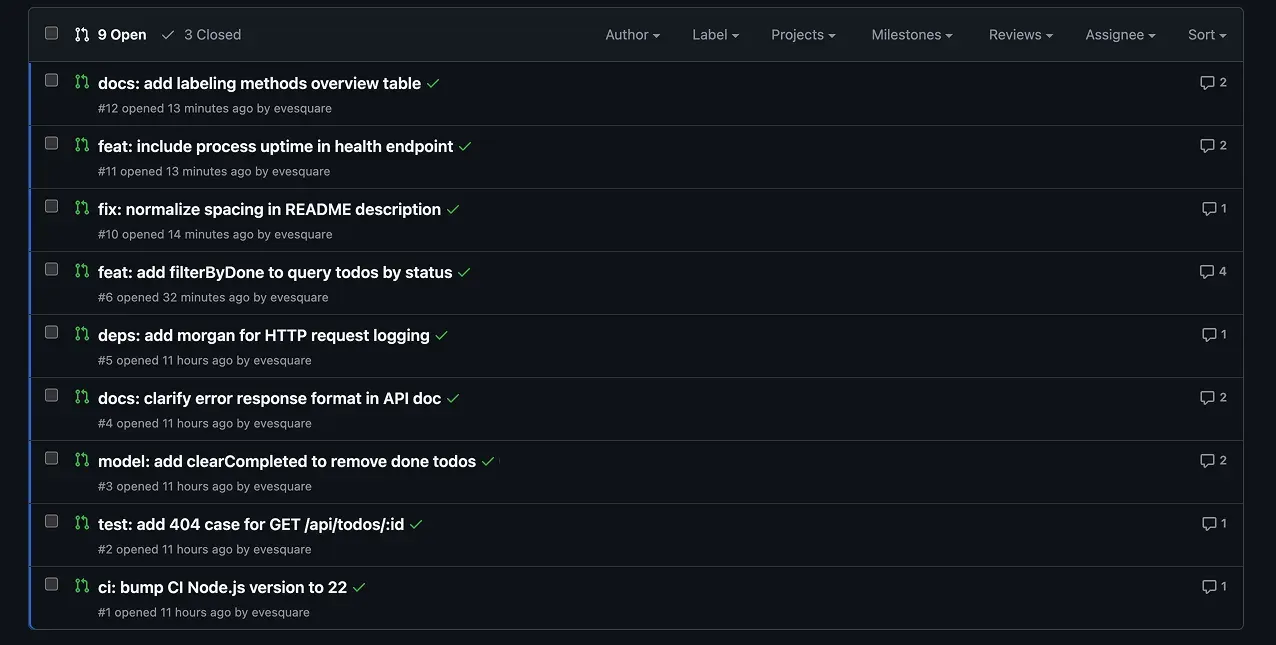
- PRs created by AI
- PRs whose contents you can’t imagine from the title alone
- PRs whose scale (size of the diff) you don’t know until you open them
- etc..
As AI-driven development has spread, agents like Claude Code and GitHub Copilot opening PRs has become routine. With GitHub Copilot, just assigning Copilot to an issue lets it process the issue in the cloud and even create the PR. While it’s become possible to process multiple issues in parallel, the weight of the human work of checking the resulting PRs has grown.
What gets difficult here is that even looking at the PR list, you can’t grasp the tendencies of their contents. From the title alone you can’t tell whether it’s a feature addition, a bug fix, or a dependency update, so you end up opening each one and checking the diff. The more PRs there are, the more this review load quietly adds up.
That’s where labels help. If you automatically attach labels for the kind of change (feature addition, bug fix, dependency update, etc.), the layer being touched (frontend, backend, etc.), and the scale of the change, you can get a sense of the contents right from the PR list. For example, for a PR that includes a model change, you can filter with something like label:model. You can also look back later at “what kinds of PRs were common.”
Note that the labeling introduced here isn’t limited to PRs opened by AI. The same rules apply to human-opened PRs too, so you can use it as a mechanism to visualize the tendencies of the whole team’s PRs.
What is GitHub Labeler
Labeler (actions/labeler) is GitHub’s official Action that automatically labels PRs. Labels that match the rules you set are attached automatically.
The mechanism is simple: write the rules in .github/labeler.yml and place a workflow that calls it in .github/workflows/. Rules are written as combinations of a “label name” and “the condition for attaching that label.”
# Attach the docs label to PRs that change files under docs/ or any Markdown
docs:
  - changed-files:
      - any-glob-to-any-file:
          - 'docs/**'
          - '**/*.md'
changed-files is a condition that looks at the paths of changed files, and if a file matching any of the globs written under any-glob-to-any-file is included, that label (here, docs) is attached. When you want to add more labels, you line up this block once per label.
What you can do with Labeler
There are two things Labeler can use regular expressions on:
- The paths of changed files (changed-files)
- The branch name (head-branch / base-branch)
In other words, you set rules and attach labels based on “which files a PR changed” and “which named branch a PR came from.” Paths are written as globs like **/*.ts, models.ts, or src/api/**, and branch names as regular expressions like ^fix/.
It’s not “judging by looking at the contents,” but purely a static, rule-based judgment on paths and branch names. Put another way, things that don’t fall under these (a PR’s title or body, the number of diff lines, the author) can’t be handled by Labeler alone. Later in the article, I’ll supplement this by combining helper workflows and dedicated Actions.
Why Labeler
If you want to read a PR’s contents and label it, one option is to pass the PR diff to an LLM and tag it dynamically. That’s flexible, but it requires an API key, and you incur usage-based charges every time a PR is opened.
Labeler, on the other hand, is a static mechanism that just matches paths and branch names against rules, so there’s no additional API usage fee. Because the judgment is simple, the behavior is easy to predict too, and results don’t fluctuate per PR. I recommend starting with Labeler, which runs free and stably, as your foundation, and adding only the missing pieces later.
What labels are good to prepare
If you add too many labels, the list gets cluttered, so at first it’s well-balanced to narrow down to the three directions of “kind,” “area,” and “scale.” Here I’ll give samples assuming a web development project. For the actual labels, adjust the regular expressions (globs) to match your project’s directory structure.
| Label | Idea of the condition | What it tells you |
|---|---|---|
docs | Changes docs/**, **/*.md | Docs-only PR |
deps | Changes package.json, pnpm-lock.yaml, etc. | Dependency package updates |
frontend | Changes src/frontend/**, **/*.tsx | Frontend-side changes |
backend | Changes src/api/**, src/server/** | Backend-side changes |
model | Changes **/models/**, models.ts | Data model / schema changes |
test | Changes **/*.test.ts, tests/** | Test additions / fixes |
ci/cd | Changes .github/workflows/** | Pipeline changes |
ai-prompt | Changes prompt definitions such as .claude/** | Changes related to AI prompts |
size:* | Number of diff lines (computed by a helper below) | PR scale |
Areas like docs, deps, and ci/cd pair well with Labeler, since the paths of changed files map almost directly to the label. On the other hand, size:* can’t be decided by path, so I’ll use a different mechanism in the applications later.
Implementation: judging AI-originated PRs and attaching labels
From here, using a repository for a simple Todo app (Node.js + Express) as the subject, I’ll show the settings I actually ran. The flow is to start with path-based labeling, then add branch-name, title, and scale applications afterward.
Attach path-based labels with labeler.yml
To run Labeler, prepare two things: .github/labeler.yml where you write the rules, and the workflow that calls it.
First, the calling-side workflow. Triggered by PRs, it just runs actions/labeler.
name: Labeler

on:
  - pull_request_target

permissions:
  contents: read
  pull-requests: write

jobs:
  label:
    runs-on: ubuntu-latest
    steps:
      - uses: actions/labeler@v5
        with:
          repo-token: ${{ secrets.GITHUB_TOKEN }}
Running it with pull_request_target is so that write access (labeling) works even for PRs from forks. Attaching labels requires the pull-requests: write permission.
Next is labeler.yml, which defines the rules. Matching the Todo app’s structure, labels are decided from the paths of changed files.
ci/cd:
  - changed-files:
      - any-glob-to-any-file:
          - '.github/workflows/**'

test:
  - changed-files:
      - any-glob-to-any-file:
          - 'test/**'
          - '**/*.test.js'

model:
  - changed-files:
      - any-glob-to-any-file:
          - 'src/models/**'

docs:
  - changed-files:
      - any-glob-to-any-file:
          - '**/*.md'
          - 'docs/**'

deps:
  - changed-files:
      - any-glob-to-any-file:
          - 'package.json'
          - 'package-lock.json'
If a file matching any of the globs listed under any-glob-to-any-file is included in the changes, that label is attached. For example, a PR that touched src/models/todo.js gets model, and a PR that touched anything under docs/ or any Markdown gets docs. Note that if a label you’re trying to attach doesn’t yet exist on GitHub, Labeler creates it automatically.
Application: judging the kind of change (branch name)
If your branch naming convention is fixed, you can attach kind labels with Labeler alone too. There’s no need to write github-script. Line up regular expressions for the branch name under head-branch, and the label is attached when one of them matches.
fix:
  - head-branch:
      - '^fix/'
      - '^hotfix/'

feature:
  - head-branch:
      - '^feature/'
      - '^feat/'
Arrays are OR conditions, so both fix/login-bug and hotfix/login-bug get the fix label.
When you want to combine with a path condition (changed-files), grouping them under all: makes an AND condition. The next example is attached only when “the branch name starts with feature/ and it changed something under src/.”
feature-src:
  - all:
      - head-branch:
          - '^feature/'
      - changed-files:
          - any-glob-to-any-file:
              - 'src/**'
There’s a caveat, though. The branch names AI agents produce don’t necessarily follow the fix/ or feature/ convention. Like Claude Code, they may attach their own prefix such as claude/.... In that case, you can’t judge the kind from the branch name alone, so you fall back to judging by PR title, next.
Application: judging the kind of change (PR title)
Labeler can’t see the title or body, so when you want to judge the kind from the title, prepare a separate workflow. Here, using actions/github-script, I regex-match Conventional Commits-style titles (feat:, fix:, etc.) and attach type:* labels.
name: PR Title Labeler

on:
  pull_request_target:
    types:
      - opened
      - edited
      - reopened
      - synchronize

permissions:
  contents: read
  pull-requests: write

jobs:
  title-label:
    runs-on: ubuntu-latest
    steps:
      - uses: actions/github-script@v7
        with:
          script: |
            const title = context.payload.pull_request.title || '';

            // Conventional Commits type → label to attach
            const rules = [
              { re: /^feat(\(.+\))?!?:/i,  label: 'type:feat' },
              { re: /^fix(\(.+\))?!?:/i,   label: 'type:fix' },
              { re: /^docs(\(.+\))?!?:/i,  label: 'type:docs' },
              { re: /^(chore|build|ci|refactor|perf|style|test)(\(.+\))?!?:/i, label: 'type:chore' },
            ];

            const matched = rules.find((r) => r.re.test(title));
            if (!matched) {
              core.info(`No conventional-commits type matched in title: "${title}"`);
              return;
            }

            await github.rest.issues.addLabels({
              owner: context.repo.owner,
              repo: context.repo.repo,
              issue_number: context.payload.pull_request.number,
              labels: [matched.label],
            });
Since edited is included in types, it gets re-applied when you fix the title later too. If the title doesn’t follow the convention, it does nothing and exits.
Application: judging the scale (size) of the change
The scale of the change (the number of diff lines) can’t be judged by Labeler either. You could use a dedicated Action (pascalgn/size-label-action or CodelyTV/pr-size-labeler). Here I’ll show a homemade implementation with actions/github-script that totals additions + deletions and attaches size:*.
name: PR Size Labeler

on:
  pull_request_target:
    types:
      - opened
      - synchronize
      - reopened

permissions:
  contents: read
  pull-requests: write

jobs:
  size-label:
    runs-on: ubuntu-latest
    steps:
      - uses: actions/github-script@v7
        with:
          script: |
            const pr = context.payload.pull_request;
            const total = pr.additions + pr.deletions;

            // Adopt the first one that matches total <= max. Thresholds are customizable.
            const thresholds = [
              { max: 10,       label: 'size:XS' },
              { max: 50,       label: 'size:S' },
              { max: 200,      label: 'size:M' },
              { max: 500,      label: 'size:L' },
              { max: Infinity, label: 'size:XL' },
            ];

            const target = thresholds.find((t) => total <= t.max).label;
            const allSizeLabels = thresholds.map((t) => t.label);

            // Remove any existing size:* labels that differ from the one being attached this time
            const current = (pr.labels || []).map((l) => l.name);
            for (const name of current) {
              if (allSizeLabels.includes(name) && name !== target) {
                await github.rest.issues.removeLabel({
                  owner: context.repo.owner,
                  repo: context.repo.repo,
                  issue_number: pr.number,
                  name,
                }).catch(() => {});
              }
            }

            await github.rest.issues.addLabels({
              owner: context.repo.owner,
              repo: context.repo.repo,
              issue_number: pr.number,
              labels: [target],
            });
The thresholds are set as follows. Adjust them to your project’s granularity.
| Label | Changed lines (additions + deletions) |
|---|---|
size:XS | ~10 |
size:S | ~50 |
size:M | ~200 |
size:L | ~500 |
size:XL | 501~ |
There are two key points. One is that, so old size:* labels don’t remain on re-run, it removes size labels other than the one being attached this time. The other is that it’s included in types so it’s re-evaluated on synchronize (an appended push) too. This way, the scale label gets swapped when you add to a PR and the diff grows.
Visualize and look back
Once labels are attached, all that’s left is to use them to take a look.
The easiest is filtering the PR list. Lining up multiple labels in GitHub’s search box like label:type:fix label:size:XS lets you narrow down with an AND condition. You can do things like pulling out only “small bug-fix PRs” and reviewing them together.
When you want to tally counts to see tendencies, the gh command is handy. You can also count the number of merged PRs with a specific label.
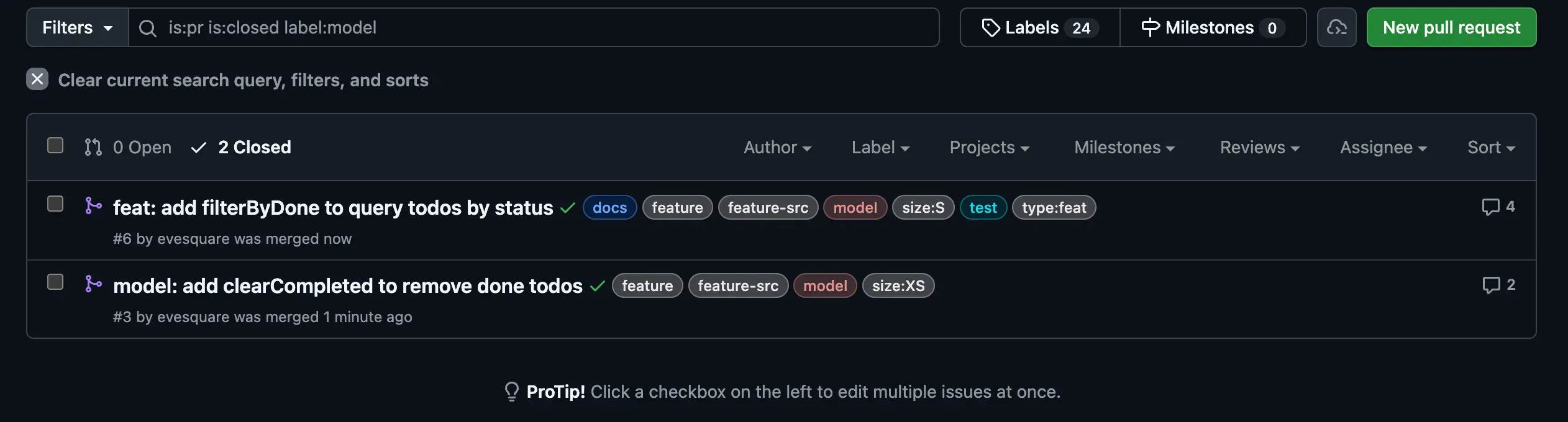 You can visualize how many times there were model changes recently.
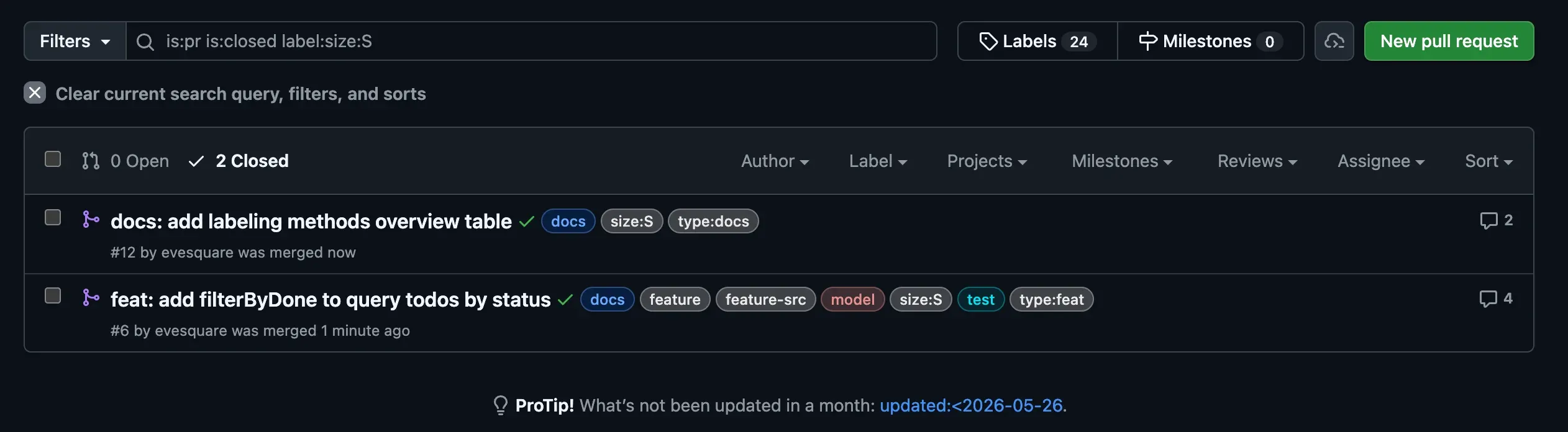 You can also see whether issues were appropriately broken down in size. If
 size:XL keeps lining up, that leads to the realization that you should split things a bit smaller before handing them to the AI.
To go further, you could run this tally periodically to build a dashboard, or notify Slack when a new PR gets a label — such extensions are conceivable too. I recommend starting with filtering and gh tallies, and automating once the need arises.
Summary
I’ve looked at the flow of visualizing PRs with Labeler, from the foundation to applications.
- Foundation: attach labels from the paths of changed files with Labeler (
docs,deps,model, etc.). Runs free and stably - Application: judge the kind by branch name. If you have a convention, it’s complete with Labeler alone
- Application: for PR titles and diff line counts, supplement with github-script or dedicated Actions (
type:*,size:*) - Use: look back at PR tendencies with PR list filters and gh command tallies
Even with just path-based labels to start, the outlook of the PR list improves markedly.
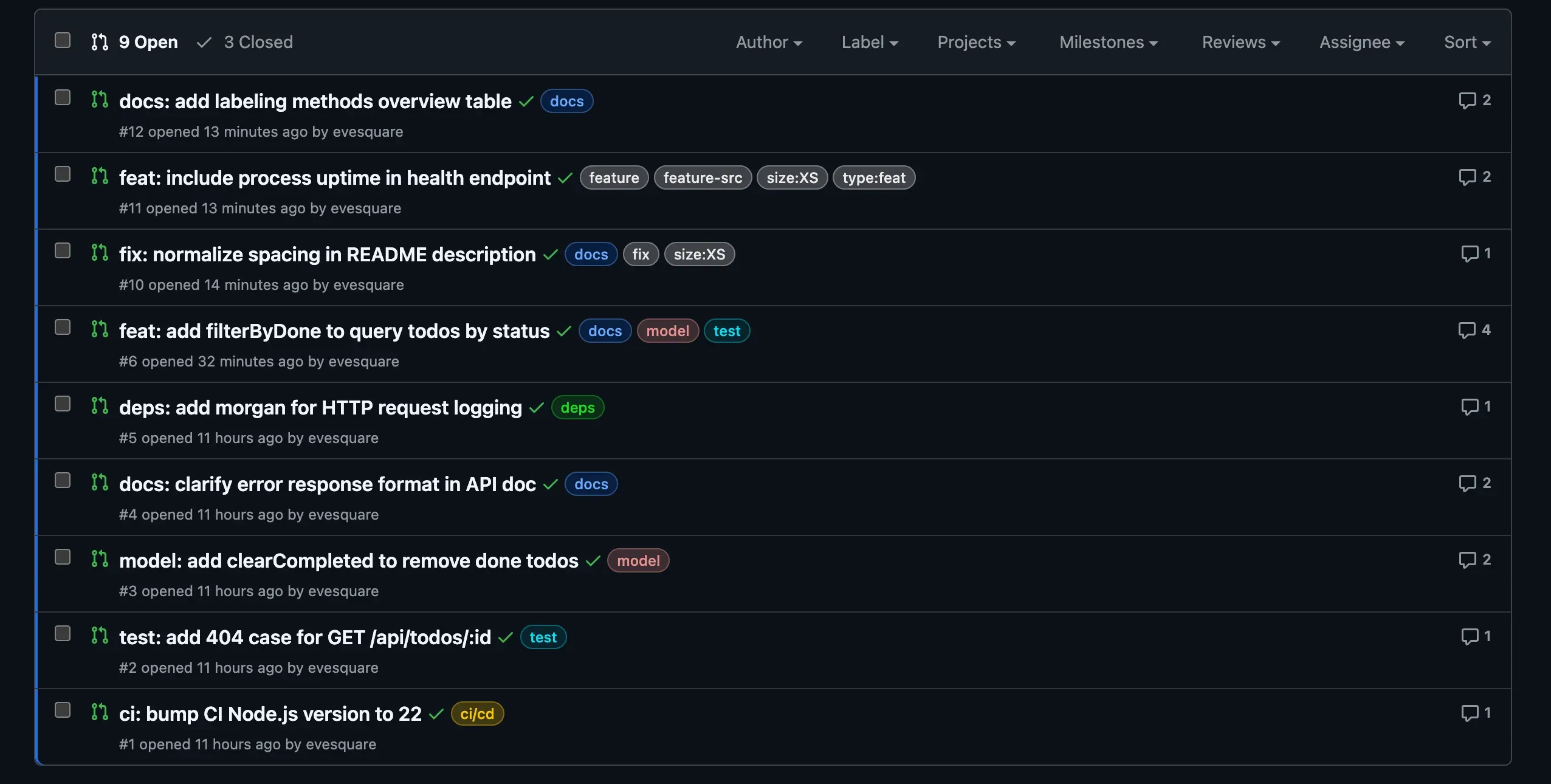 By setting up labels, the PR list we saw at the start also changed into PRs you can roughly understand like this. The more PRs increase with AI-driven development, the greater the effect of this visualization should be.
References
 https://github.com/actions/labeler