Introduction
I put together the actual process I go through when learning a new programming language. When I started programming, I first learned C, and then Python. After that I learned JavaScript (TypeScript), but there are still plenty of languages I don’t know. Here I’ve summarized how someone like me learns a new language “well enough.”
Languages I use often: Python, JavaScript (TypeScript) Languages I know reasonably well: C, Swift, Java, PHP, R Languages I’ve only touched a bit: Elm, Flutter, Go, Rust, C++, Ruby
Since I’m a web engineer, most of the languages I use often are ones used in web development.
Rather than learning from scratch, this is probably the process for someone who already knows how to program and is learning a new language. 💦
Defining “well enough”
What I mean by “understanding a language well enough” is the following.
- You understand the basic syntax of the language, such as if statements and for loops
It’s fine even if you don’t remember everything perfectly, as long as you can write it while looking things up
- You can write simple programs in the language
For example, you can solve FizzBuzz or build a simple app
- When looking up the language’s syntax, you can read and understand articles such as the official documentation
For example, you can read the descriptions of classes and methods in the official docs and use them
- You can read the language’s error messages, identify the cause, and fix it (syntax errors, etc.)
For example, you can read an error message, look it up on Stack Overflow1, and fix it
- You have a rough understanding of the ecosystem around the language
For example, package managers and lint tools
- You can roughly use external libraries and frameworks available in the language
You can figure out how to add and use libraries by looking things up
Choosing the language to learn this time
Now that we’ve defined the goal, let’s choose the language to actually start learning. Each language has its own characteristics, so pick a language whose characteristics fit what you want to learn. For example, if you want to do web development, it’s good to learn languages like JavaScript, PHP, Python, or Ruby that come up when you search for “web development language market share.” If you’re job hunting, it’s good to search for “programming languages with the most job postings” and learn a language with plenty of openings. For game development, it’s good to look up and learn languages commonly used in game development. Learning a language you use at work is also a good idea.
In my case, I do web development at work, and I ended up having to work with an application written in Ruby. So I decided to learn Ruby.
How to learn until you understand “well enough”
Get your background knowledge in order
Above all, it’s important to know what kind of language it is. First, let’s search for “programming language Ruby what is it.”
Looking at Wikipedia, we can see that Ruby has the following characteristics.
Ruby is an object-oriented scripting language developed by Yukihiro Matsumoto (commonly known as Matz), characterized by its concise syntax. It was the first programming language developed in Japan to be certified as an international standard by the International Electrotechnical Commission (IEC).
🦔 < I see…
Let’s also look into what it’s used for.
Building application sites and Web APIs, scraping, smartphone apps, machine learning
🦔 < Smartphone apps…? Anyway, so you can build web apps and such with simple syntax!!
If you want to see what has actually been built with it, searching for “awesome-XX” is a good idea.
 https://github.com/markets/awesome-ruby
Being able to write simple programs
Setting up the execution environment
First, set up an environment where Ruby runs on your computer. I forgot to mention it, but I use a Mac, so everything here is about the Mac. Ruby is often included on a Mac by default, but instead of installing Ruby directly on the Mac, I decided to use a virtual environment2 to run Ruby.
When I searched for “building a virtual environment Ruby,” a Progate article came up. It looks good.
 https://prog-8.com/docs/ruby-env
You can build a Ruby virtual environment by following this, but I decided to install Ruby using asdf. I’ve written about the details in a separate article.
 https://qiita.com/EveSquare/items/7d0d4c122f055aed63ae
🦔 < The environment to run Ruby is ready
Learning the basic syntax
Once you’re here, learn the basic syntax of Ruby. Let’s search for “Ruby introduction” to find useful resources. I found a site called Try Ruby. I decided to learn with this. I’ve written the details in a separate article below.
https://qiita.com/EveSquare/items/89c9d73020f52fc10421
Writing a simple program ✅
Based on what I learned on Try Ruby, let’s write some simple programs.
Simple program: Hello, World!
The most basic program, the first one you write in any language, is “Hello, World!” Let’s run it quickly.
puts 'Hello, World'$ ruby hello.rbSimple program: FizzBuzz
First, let’s solve the FizzBuzz problem. The FizzBuzz problem is as follows.
- When divisible by 3, print “Fizz”
- When divisible by 5, print “Buzz”
- When divisible by both, print “FizzBuzz”
- Do this for the numbers from 1 to 100
The final output looks like this.
1
2
Fizz
4
Buzz
Fizz
7
8
Fizz
...
You can solve it using the four arithmetic operations, a for loop, if statements, and print statements. An example implementation looks like this.
(1..100).each do |i|
  if (i % 3).zero? && (i % 5).zero?
    puts 'FizzBuzz'
  elsif (i % 3).zero? # when it's a multiple of 3
    puts 'Fizz'
  elsif (i % 5).zero? # when it's a multiple of 5
    puts 'Buzz'
  else # otherwise
    puts i
  end
end
$ ruby fizzbuzz.rbLet’s actually run it and check that it produces the expected output.
Simple program: CLI Todo app
By building a Todo app that runs on the CLI, you can learn about classes, file operations, and so on. Let’s build a simple Todo app with the following features.
a task_nameto add a tasklto list tasksd task_numberto delete a taskqto quit
Being able to read and understand the official documentation ✅
You don’t need to read all of it, but it’s good to be able to read and understand the basic syntax and the descriptions of classes and methods.
You can learn about handy features and ways to write things more concisely.
For example, reading Ruby’s official documentation, I found that there’s a times method.
https://docs.ruby-lang.org/en/latest/method/Integer/i/times.html
The times method repeats a block the specified number of times.
Using this, you can write code like the following more concisely.
# Print Hello, World three times
3.times do
  puts 'Hello, World'
end
Searching for “ruby docs3” and the like will lead you to Ruby’s official documentation.
https://docs.ruby-lang.org/en/latest/library/index.html
Being able to read error messages and fix them ✅
It’s important to be able to read error messages, identify the cause, and fix it. Suppose you write the following code for the FizzBuzz problem from earlier and run it.
(1..100).each do |i|
  if (i % 3).zero? && (i % 5).zero
    puts 'FizzBuzz'
  elsif (i % 3).zero? # when it's a multiple of 3
    puts 'Fizz'
  elsif (i % 5).zero? # when it's a multiple of 5
    puts 'Buzz'
  else # otherwise
    puts i
  end
end
Then you get an error like this.
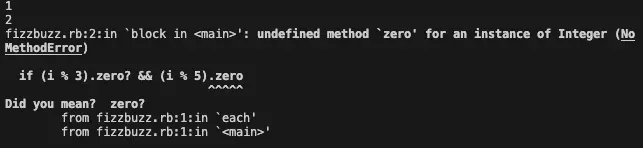
If you read the error message carefully, it says Did you mean? zero? and clearly points out the relevant spot, so check there and fix it.
The cause of the error is the (i % 5).zero part, where the ? is missing, causing a syntax error.
Fix it to (i % 5).zero? and run it again, and you can confirm that it works correctly.
Also, there are often things you can’t figure out just from reading the error message. This example was mostly understandable just from reading it, but supposing you couldn’t figure it out, searching for “Ruby Did you mean? zero?” turns up information about this error.
Around the fifth result from the top, I found the following article.
 https://techracho.bpsinc.jp/hachi8833/2023_05_10/129166
Ruby: For checking a number for zero, use the ‘zero?’ method rather than ’== 0’ (translation)…
So it turns out you should use the zero? method.
Getting a rough understanding of the ecosystem ✅
Get a rough understanding of what package managers, external libraries, and frameworks Ruby has.
Searching for “Ruby package manager,” I found that there’s a package manager called bundler.
https://qiita.com/daiti0113/items/45bb862625c898d3bc51
I found that by introducing bundler, you can add libraries and manage versions.
I found that you write library dependencies in a file called Gemfile and install them with bundle install.
 https://zenn.dev/yuuuuu/articles/59689369aec8f0
Being able to roughly use external libraries and frameworks ✅
I wanted to try web scraping, so I used a library called selenium.
Using the bundler from earlier, I added selenium-webdriver to the Gemfile, installed selenium, and tried scraping.
I wrote the details of what I tried in the article below.
https://qiita.com/EveSquare/items/67c6a3be7116b5d44c34
Until you understand well enough
With a learning method like the above, you can learn a new programming language. Once you get here, I think you’ll be able to write a fair amount of programs. By learning one programming language, learning others becomes smoother too. In fact, the ability to learn programming languages comes down to your search skills and reading comprehension. By looking things up yourself and solving problems yourself, you build problem-solving skills. Also, when you hit a wall of a problem, it’s important not to shrink back and give up, but to put in the effort to overcome that wall.
Conclusion
I think there are things you come to see by touching various programming languages. There’s no doubt that learning new languages will improve your programming skills.
Footnotes
-
Stack Overflow is a site where you can exchange questions and answers about programming. When you get an error, searching the error content on Google often brings this site near the top of the results. ↩
-
A virtual environment means creating a virtual environment without installing another OS or program directly on your computer. This lets you manage versions and prevent interference with other programs. ↩
-
This refers to documentation. Since it’s “documents” in English, it’s sometimes abbreviated as docs. Official documentation is documentation written by the developers of the language or library. By reading the official docs, you can learn how to use the language or library and its specifications. ↩