Introduction
I’ve developed web applications mostly with Django up to now. Define a model in models.py, then pull data out with User.objects.filter(...). I got completely used to this style, and I could achieve most things with the Django ORM.
On the other hand, I don’t really understand raw SQL. I know words like SELECT, WHERE, and JOIN, but I can’t accurately explain what each of them does or how to write it. Since the ORM does everything, I rarely ran into trouble.
The reason I decided to relearn it anyway is that I wanted to have options beyond Django. When I thought about building web apps in other languages and frameworks like Prisma, TypeORM, or GraphQL, I realized that rather than learning how to use each ORM individually, it would be faster to properly nail down the SQL knowledge and concepts underneath them once. If I understand SQL, I should be able to read any ORM’s documentation and think, “ah, this is assembling that SQL.”
Fortunately, I have a decent grasp of what the Django ORM can do. So instead of reading an SQL textbook from scratch, I’ll learn by checking “what SQL the Django code I usually write actually becomes underneath.” I plan to make it a four-part series like this.
- Model Definition (this article): what kind of tables a models.py definition becomes
- Model Changes: what ALTER TABLE runs behind makemigrations and migrate
- Queries: what queries run behind filter and update
- Performance Tuning: the N+1 problem, select_related / prefetch_related, and the internals of aggregation
This is the first part, Model Definition. When you write CharField, ForeignKey, or ManyToManyField, what tables actually get created in the database? I’ll check that while looking at the generated SQL.
The intended reader is a web engineer like me who “can write the Django ORM but isn’t confident about SQL.”
Since this is based on my own research, it may contain errors. If you notice anything, I’d appreciate a heads-up.
Test environment
The code in this series was run and verified in the following environment.
- Python 3.14.0
- Django 6.0.6
- PostgreSQL 17 (started via Docker)
- psycopg 3.3.4
I use PostgreSQL as the database. Some of the generated SQL varies by database (such as the JSONField type), and where the differences from SQLite or MySQL are significant, I’ll mention them in the text as they come up.
The sample models used in this series
Throughout the four articles, this series reuses the same models. The subject is a blog service, which is a familiar theme for this blog, with five models: User, Profile, Tag, Post, and Comment.
- User — a reference point with just a name and email address. Referenced by other models
- Profile — one-to-one with User (OneToOneField). Holds a self-introduction and a JSONField of links
- Post — the main character. Packed with everything I want to check: a foreign key to the author, a TextChoices status, view count, publish date, created/updated timestamps, and a ManyToMany to tags
- Tag — a model with just a name. The other side of the ManyToMany with Post
- Comment — has two foreign keys, to Post and to User. Comes into play from the Queries article onward
Seemingly unnecessary fields like view_count and comments are included so they can serve as material for aggregation and the N+1 problem in the later Queries and Performance Tuning articles.
Here is the full models.py.
Full blog/models.py
from django.db import models


class User(models.Model):
    name = models.CharField(
        max_length=100,
    )

    email = models.EmailField(
        unique=True,
    )

    def __str__(self):
        return self.name


class Profile(models.Model):
    user = models.OneToOneField(
        User,
        on_delete=models.CASCADE,
    )

    bio = models.TextField(
        blank=True,
    )

    links = models.JSONField(
        default=dict,
        blank=True,
    )

    def __str__(self):
        return f"Profile of {self.user}"


class Tag(models.Model):
    name = models.CharField(
        max_length=50,
        unique=True,
    )

    def __str__(self):
        return self.name


class Post(models.Model):
    class Status(models.TextChoices):
        DRAFT = "draft", "下書き"
        PUBLISHED = "published", "公開"
        ARCHIVED = "archived", "アーカイブ"

    author = models.ForeignKey(
        User,
        on_delete=models.CASCADE,
        related_name="posts",
    )

    title = models.CharField(
        max_length=200,
    )

    slug = models.SlugField(
        max_length=200,
    )

    body = models.TextField()

    status = models.CharField(
        max_length=20,
        choices=Status.choices,
        default=Status.DRAFT,
    )

    view_count = models.PositiveIntegerField(
        default=0,
    )

    published_at = models.DateTimeField(
        null=True,
        blank=True,
    )

    created_at = models.DateTimeField(
        auto_now_add=True,
    )

    updated_at = models.DateTimeField(
        auto_now=True,
    )

    tags = models.ManyToManyField(
        Tag,
        related_name="posts",
        blank=True,
    )

    class Meta:
        constraints = [
            models.UniqueConstraint(
                fields=["author", "slug"],
                name="unique_author_slug",
            )
        ]

    def __str__(self):
        return self.title


class Comment(models.Model):
    post = models.ForeignKey(
        Post,
        on_delete=models.CASCADE,
        related_name="comments",
    )

    author = models.ForeignKey(
        User,
        on_delete=models.CASCADE,
        related_name="comments",
    )

    body = models.TextField()

    created_at = models.DateTimeField(
        auto_now_add=True,
    )

    def __str__(self):
        return f"Comment by {self.author} on {self.post}"
Drawing the relationships between the models as an ER diagram looks like this.
erDiagram
    USER ||--o| PROFILE : "OneToOne"
    USER ||--o{ POST : "author"
    USER ||--o{ COMMENT : "author"
    POST ||--o{ COMMENT : "post"
    POST }o--o{ TAG : "ManyToMany"

    USER {
        bigint id PK
        varchar name
        varchar email UK
    }
    PROFILE {
        bigint id PK
        bigint user_id FK "UNIQUE"
        text bio
        jsonb links
    }
    POST {
        bigint id PK
        bigint author_id FK
        varchar title
        varchar slug "composite UNIQUE with author"
        text body
        varchar status "TextChoices: draft/published/archived"
        integer view_count
        timestamptz published_at "nullable"
        timestamptz created_at "auto_now_add"
        timestamptz updated_at "auto_now"
    }
    TAG {
        bigint id PK
        varchar name UK
    }
    COMMENT {
        bigint id PK
        bigint post_id FK
        bigint author_id FK
        text body
        timestamptz created_at "auto_now_add"
    }
How to check the SQL the ORM issues
Once the models are defined, I create migration files as usual.
python manage.py makemigrations blogNormally I’d just run migrate and be done, but what I want to know here is “what actually gets executed at that point.” Django provides a command for exactly this: sqlmigrate displays the SQL a migration issues without executing it.
python manage.py sqlmigrate blog 0001Here is the full SQL produced for the five models above.
Full sqlmigrate output
BEGIN;
--
-- Create model Tag
--
CREATE TABLE "blog_tag" ("id" bigint NOT NULL PRIMARY KEY GENERATED BY DEFAULT AS IDENTITY, "name" varchar(50) NOT NULL UNIQUE);
--
-- Create model User
--
CREATE TABLE "blog_user" ("id" bigint NOT NULL PRIMARY KEY GENERATED BY DEFAULT AS IDENTITY, "name" varchar(100) NOT NULL, "email" varchar(254) NOT NULL UNIQUE);
--
-- Create model Profile
--
CREATE TABLE "blog_profile" ("id" bigint NOT NULL PRIMARY KEY GENERATED BY DEFAULT AS IDENTITY, "bio" text NOT NULL, "links" jsonb NOT NULL, "user_id" bigint NOT NULL UNIQUE);
--
-- Create model Post
--
CREATE TABLE "blog_post" ("id" bigint NOT NULL PRIMARY KEY GENERATED BY DEFAULT AS IDENTITY, "title" varchar(200) NOT NULL, "slug" varchar(200) NOT NULL, "body" text NOT NULL, "status" varchar(20) NOT NULL, "view_count" integer NOT NULL CHECK ("view_count" >= 0), "published_at" timestamp with time zone NULL, "created_at" timestamp with time zone NOT NULL, "updated_at" timestamp with time zone NOT NULL, "author_id" bigint NOT NULL);
CREATE TABLE "blog_post_tags" ("id" bigint NOT NULL PRIMARY KEY GENERATED BY DEFAULT AS IDENTITY, "post_id" bigint NOT NULL, "tag_id" bigint NOT NULL);
--
-- Create model Comment
--
CREATE TABLE "blog_comment" ("id" bigint NOT NULL PRIMARY KEY GENERATED BY DEFAULT AS IDENTITY, "body" text NOT NULL, "created_at" timestamp with time zone NOT NULL, "post_id" bigint NOT NULL, "author_id" bigint NOT NULL);
--
-- Create constraint unique_author_slug on model post
--
ALTER TABLE "blog_post" ADD CONSTRAINT "unique_author_slug" UNIQUE ("author_id", "slug");
CREATE INDEX "blog_tag_name_c5718cc8_like" ON "blog_tag" ("name" varchar_pattern_ops);
CREATE INDEX "blog_user_email_8f71103d_like" ON "blog_user" ("email" varchar_pattern_ops);
ALTER TABLE "blog_profile" ADD CONSTRAINT "blog_profile_user_id_2bc46caa_fk_blog_user_id" FOREIGN KEY ("user_id") REFERENCES "blog_user" ("id") DEFERRABLE INITIALLY DEFERRED;
ALTER TABLE "blog_post" ADD CONSTRAINT "blog_post_author_id_dd7a8485_fk_blog_user_id" FOREIGN KEY ("author_id") REFERENCES "blog_user" ("id") DEFERRABLE INITIALLY DEFERRED;
CREATE INDEX "blog_post_slug_b95473f2" ON "blog_post" ("slug");
CREATE INDEX "blog_post_slug_b95473f2_like" ON "blog_post" ("slug" varchar_pattern_ops);
CREATE INDEX "blog_post_author_id_dd7a8485" ON "blog_post" ("author_id");
ALTER TABLE "blog_post_tags" ADD CONSTRAINT "blog_post_tags_post_id_tag_id_4925ec37_uniq" UNIQUE ("post_id", "tag_id");
ALTER TABLE "blog_post_tags" ADD CONSTRAINT "blog_post_tags_post_id_a1c71c8a_fk_blog_post_id" FOREIGN KEY ("post_id") REFERENCES "blog_post" ("id") DEFERRABLE INITIALLY DEFERRED;
ALTER TABLE "blog_post_tags" ADD CONSTRAINT "blog_post_tags_tag_id_0875c551_fk_blog_tag_id" FOREIGN KEY ("tag_id") REFERENCES "blog_tag" ("id") DEFERRABLE INITIALLY DEFERRED;
CREATE INDEX "blog_post_tags_post_id_a1c71c8a" ON "blog_post_tags" ("post_id");
CREATE INDEX "blog_post_tags_tag_id_0875c551" ON "blog_post_tags" ("tag_id");
ALTER TABLE "blog_comment" ADD CONSTRAINT "blog_comment_post_id_580e96ef_fk_blog_post_id" FOREIGN KEY ("post_id") REFERENCES "blog_post" ("id") DEFERRABLE INITIALLY DEFERRED;
ALTER TABLE "blog_comment" ADD CONSTRAINT "blog_comment_author_id_4f11e2e0_fk_blog_user_id" FOREIGN KEY ("author_id") REFERENCES "blog_user" ("id") DEFERRABLE INITIALLY DEFERRED;
CREATE INDEX "blog_comment_post_id_580e96ef" ON "blog_comment" ("post_id");
CREATE INDEX "blog_comment_author_id_4f11e2e0" ON "blog_comment" ("author_id");
COMMIT;
A very long string came out. This is the SQL that actually gets executed, so I’ll unravel it one statement at a time.
You can see the CREATE TABLE statements corresponding to the five models I wrote in models.py lined up. I’ll read them one by one starting in the next chapter, but even just glancing at the whole thing, something already stood out to me: the BEGIN; at the start and the COMMIT; at the end.
Looking it up, these are transaction syntax1. When BEGIN; starts a transaction, changes from then on aren’t committed yet, and only when COMMIT; finally runs are they all applied together. If an error occurs partway, all changes up to that point are undone, so you never end up in a half-finished state like “only three of the five tables got created.” The entire migration is wrapped in a single transaction to make it safe to retry even if it fails.
In the following chapters, I’ll cut out this output little by little and unravel the parts I found puzzling.
What CREATE TABLE does a basic model become?
I’ll start with the simplest model, Tag. Its models.py definition is just this.
class Tag(models.Model):
    name = models.CharField(
        max_length=50,
        unique=True,
    )
Of the sqlmigrate output, this one statement corresponds to it. The actual output is on a single line, but I formatted it for readability.
CREATE TABLE "blog_tag" (
  "id" bigint NOT NULL PRIMARY KEY GENERATED BY DEFAULT AS IDENTITY,
  "name" varchar(50) NOT NULL UNIQUE
);
Here are my questions and impressions at this point. I looked into each.
- The table name is “blog_tag.” The model name is Tag, so is it named by the rule “Django app name_model name”?
- → Exactly. The default is “app name_model name (lowercase).”
- On the id line, up to NOT NULL is fine, but
PRIMARY KEY GENERATED BY DEFAULT AS IDENTITYis long. It reads like English; do people who write SQL by hand type this every time?- → This is the standard way to write auto-numbering in current PostgreSQL, apparently. There’s also the older, shorter
bigserialway.
- → This is the standard way to write auto-numbering in current PostgreSQL, apparently. There’s also the older, shorter
NOT NULL UNIQUEis intuitive.
How to read CREATE TABLE
The first thing I noticed was CREATE TABLE. Even without knowing it well, it’s something I’ve vaguely heard of.
Looking it up, it’s a statement that creates a table, as the name suggests, and is a kind of SQL called DDL (Data Definition Language)2. It’s classified differently from SQL that manipulates data, like SELECT or UPDATE; it’s syntax for defining the container that is the table itself. The basic syntax is this form.
CREATE TABLE table_name (
  column_name_1 type constraint,
  column_name_2 type constraint,
  column_name_3 type constraint,
  ...
);
A column definition is a three-part set of “column name, type, constraint.” The constraint can be omitted, and conversely you can list several separated by spaces.
With that in mind, looking at the output SQL, "blog_tag" is the table name, and "id" and "name" are column names. bigint and varchar(50) are the types. The 50 in varchar(50) is the max_length=50 written on the CharField, passed through as-is. And the NOT NULL (forbids NULL) and UNIQUE (forbids duplicate values) that follow the type are constraints. Breaking down the name column definition, "name" is the column name, varchar(50) is the type, and NOT NULL UNIQUE is two constraints — it fits neatly into the three-part set. UNIQUE is the unique=True written on the model, passed through as-is.
Field-to-type correspondence table
I understand that CharField becomes varchar. Looking across the full output, other types like text, integer, timestamp, and bigint also appear. Let me match up which field became which type, within the scope of the sample models.
| Django field | PostgreSQL type | Example in the sample models |
|---|---|---|
| BigAutoField | bigint | each table’s id (grows automatically) |
| CharField(max_length=50) | varchar(50) | Tag.name |
| EmailField | varchar(254) | User.email |
| SlugField | varchar(200) | Post.slug |
| TextField | text | Post.body, Profile.bio |
| PositiveIntegerField | integer + CHECK constraint | Post.view_count |
| DateTimeField | timestamp with time zone | Post.created_at, etc. |
| JSONField | jsonb | Profile.links |
| ForeignKey / OneToOneField | bigint | Post.author_id, etc. |
Comparing them, I noticed a few things.
- Both EmailField and SlugField are just varchar in the DB. Whether something is a valid email address is validated on the Django side; the database knows nothing about it. The 254 in varchar(254) is the default max_length of EmailField
- PositiveIntegerField doesn’t mean there’s a “positive integer” type in the DB; it’s realized by attaching a
CHECK ("view_count" >= 0)constraint to the integer type - The ForeignKey columns (like author_id) are bigint because the referenced id is bigint. A foreign key’s type is determined to match the other side’s id type
The interesting part is that EmailField and SlugField both become the same varchar in SQL. It feels like a design where format checking is handled on the Django side.
I got curious about fields that didn’t appear in the sample models, and here is how those fields map.
PostgreSQL backend correspondence table (excerpt)
| Django field | PostgreSQL type |
|---|---|
| BooleanField | boolean |
| IntegerField | integer |
| SmallIntegerField | smallint |
| BigIntegerField | bigint |
| FloatField | double precision |
| DecimalField | numeric(max_digits, decimal_places) |
| DateField | date |
| TimeField | time |
| DurationField | interval |
| UUIDField | uuid |
The real form of JSONField
One thing in the correspondence table caught my eye: JSONField. It became the unfamiliar type jsonb. This is a JSON-specific type that PostgreSQL has; it’s stored not as a plain string but in a form where the structure is interpreted. Thanks to this, you can do things on the DB side like “search by the value of this key inside links”3.
Where do null, blank, and default show up?
The Post model has fields that specify null=True, blank=True, and default. Let me check where these went in the DDL.
status = models.CharField(
    max_length=20,
    choices=Status.choices,
    default=Status.DRAFT,
)

published_at = models.DateTimeField(
    null=True,
    blank=True,
)
Cutting out the relevant columns from blog_post’s CREATE TABLE looks like this.
"status" varchar(20) NOT NULL,
"published_at" timestamp with time zone NULL,
First, null=True. Among blog_post’s columns, only published_at is NULL rather than NOT NULL. Django fields default to null=False, so if you specify nothing a NOT NULL constraint is added, and only when you write null=True is NULL permitted — a straightforward correspondence.
Next, blank=True, but this appears nowhere in the DDL. blank is a Django-only setting about whether to allow empty values in form validation; the database has nothing to do with it.
What was surprising was default. SQL has DEFAULT-clause syntax to specify a default value2, but it’s not reflected in the DDL. Django seems to fill in the default value at the point it issues the INSERT.
The real form of TextChoices
Post.status uses TextChoices to define three options: draft/published/archived.
class Status(models.TextChoices):
    DRAFT = "draft", "下書き"
    PUBLISHED = "published", "公開"
    ARCHIVED = "archived", "アーカイブ"

status = models.CharField(
    max_length=20,
    choices=Status.choices,
    default=Status.DRAFT,
)
Here’s what this became in the DDL.
"status" varchar(20) NOT NULL,Just a varchar. The information about the draft/published/archived options is nowhere in the DDL. That made me wonder whether the choices check isn’t done in the DB. As a test, I directly INSERTed a value not in the choices. I entered psql (PostgreSQL’s interactive console) with python manage.py dbshell and tried putting ‘banana’ into status.

INSERT 0 1, meaning success. Looking at the table, banana, which shouldn’t be an allowed option, is registered normally.
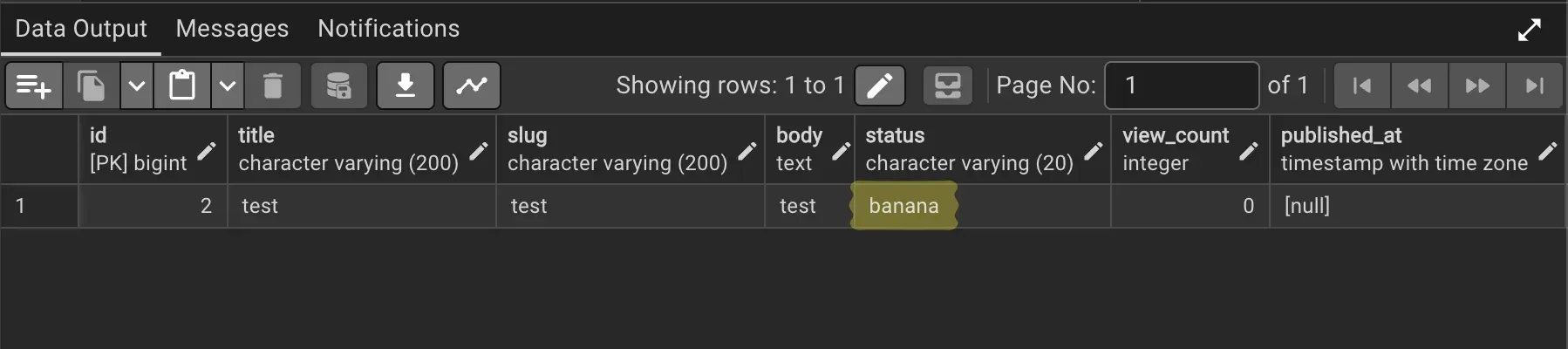
From this result, I learned that TextChoices options aren’t involved with the DB at all, and the check is done by Django’s validation. choices is for “building form options + validating during validation”; it’s not a database constraint.
The true identity of auto_now_add and auto_now
Next are created_at and updated_at.
created_at = models.DateTimeField(
    auto_now_add=True,
)

updated_at = models.DateTimeField(
    auto_now=True,
)
In the DDL, they looked like this.
"created_at" timestamp with time zone NOT NULL,
"updated_at" timestamp with time zone NOT NULL,
Neither auto_now_add nor auto_now leaves any trace in the DDL. I looked into how you’d do “insert the current time on creation” in SQL, and SQL has date/time functions like CURRENT_TIMESTAMP and CURRENT_DATE, and putting these in the DEFAULT is the standard approach4.
-- how you'd write it in SQL
"created_at" timestamp with time zone NOT NULL DEFAULT CURRENT_TIMESTAMP,
But Django doesn’t use this either. For auto_now_add/auto_now timestamps, Django gets the current time on the Python side every time it saves, and embeds the value directly into the INSERT or UPDATE. It’s the same “actually the Django side” pattern as choices and default, which is why writes that don’t go through the ORM (raw SQL, DB GUI tools, and so on) don’t get the timestamp automatically.
How do relationships become tables?
Next are relationships. The sample models include three kinds: ForeignKey (Post.author, Comment), OneToOneField (Profile.user), and ManyToManyField (Post.tags). Here were my predictions from a quick glance at the output.
- OneToOne seems to make the column holding the other side’s id NOT NULL UNIQUE
- ForeignKey looks like it just puts the other side’s id number into a bigint NOT NULL column
- ManyToMany creates a new table, with lots of records holding the referencing and referenced ids
I was roughly right, but as I checked the answers, each prediction hid one important element a level deeper.
ForeignKey
Post.author’s definition is this.
author = models.ForeignKey(
    User,
    on_delete=models.CASCADE,
    related_name="posts",
)
The corresponding SQL was split into two places: one column inside blog_post’s CREATE TABLE, and the ALTER TABLE after it. I’ve formatted it for readability (a CREATE INDEX is also issued for author_id, but the index discussion is planned for the Performance Tuning article).
-- inside CREATE TABLE "blog_post"
"author_id" bigint NOT NULL

-- executed together afterward
ALTER TABLE "blog_post"
  ADD CONSTRAINT "blog_post_author_id_dd7a8485_fk_blog_user_id"
  FOREIGN KEY ("author_id") REFERENCES "blog_user" ("id")
  DEFERRABLE INITIALLY DEFERRED;
First, even though the model called it author, the column name is author_id. The column itself was, as predicted, “a bigint column holding the other side’s id number.” The other side’s id is bigint, so this one is too.
Next, the ALTER TABLE. ALTER TABLE is a command to modify an already-created table afterward, and ADD CONSTRAINT means “add a constraint.” So what is the long string right after, "blog_post_author_id_dd7a8485_fk_blog_user_id"? This is the name given to the constraint being added. Django auto-generates it in the form “table name_column name_hash_fk_referenced target.” By naming a constraint, you can later delete or replace just this constraint with DROP CONSTRAINT constraint_name. It’s an essential mechanism for Django, which keeps changing the schema through migrations, and it’ll actually come into play with model changes. The dd7a8485 hash in the middle is there to avoid constraint-name collisions.
And the FOREIGN KEY ... REFERENCES ... part is the body of the foreign key constraint. Generalizing the syntax, there were three ways to write a foreign key constraint.
-- 1. write it directly in the column definition (column constraint)
CREATE TABLE table_name (
  column_name type REFERENCES referenced_table (referenced_column)
);

-- 2. write it as a table constraint
CREATE TABLE table_name (
  column_name type,
  FOREIGN KEY (column_name) REFERENCES referenced_table (referenced_column)
);

-- 3. add it later with ALTER TABLE (this is what Django does)
ALTER TABLE table_name
  ADD CONSTRAINT constraint_name
  FOREIGN KEY (column_name) REFERENCES referenced_table (referenced_column);
Django uses the third approach apparently because, by adding all the constraints together after every table is created, it doesn’t have to worry about the order of reference relationships between tables.
Looking into it again, I realized I hadn’t understood foreign key constraints themselves at all. My mental model was something like “the DB nicely interprets the number” for a column like author_id. The actual job of a foreign key constraint is simple: “the only values you may put in this column are ones that actually exist in the referenced table.” If you could create a broken reference — a number in the source but no such row in the target — you’d get an error when you followed it, so the DB rejects any INSERT or UPDATE that would cause that. The reverse direction is protected too: trying to delete a still-referenced row is an error.
At first I thought NOT NULL and UNIQUE might be part of the foreign key constraint, but these are separate constraints. author_id’s NOT NULL is there just because Django’s ForeignKey defaults to null=False; set null=True and the NOT NULL disappears (NULL, meaning “no reference,” becomes allowed). UNIQUE isn’t attached to ForeignKey; it shows up with the next OneToOneField.
Here I made an interesting discovery. Even though I wrote on_delete=models.CASCADE in the model, it appears nowhere in the DDL. And SQL does have ON DELETE CASCADE syntax.
Looking it up, this is Django’s intentional design. The official docs clearly state that “Django emulates the behavior of the SQL constraint specified by on_delete” and that “on_delete does not create an SQL constraint in the database”5. In other words, the deletion cascade is executed on the Python side, not in the DB.
The biggest reason is signals. Django has a signal mechanism called pre_delete/post_delete, and it’s specified to fire for every related object swept up and deleted by CASCADE as well. If deletion were left to the DB, the Python side couldn’t know what was deleted, so it couldn’t fire signals. That’s why Django collects the related objects with a SELECT before deleting, then issues the DELETEs itself.
Another reason is that on_delete’s options don’t map one-to-one to SQL’s ON DELETE clause. SQL also has options like CASCADE/RESTRICT/SET NULL/SET DEFAULT; for example, Django has PROTECT. This means “reject deletion of a referenced row,” corresponding to SQL’s RESTRICT. Rather than mapping one-to-one, moving everything to the Python side keeps the behavior consistent across every option and every database.
Note that the DEFERRABLE INITIALLY DEFERRED attached to the end of the FOREIGN KEY constraint means “defer the constraint check until COMMIT”6.
OneToOneField
Profile.user’s definition is this.
user = models.OneToOneField(
    User,
    on_delete=models.CASCADE,
)
Cutting out the corresponding SQL.
-- inside CREATE TABLE "blog_profile"
"user_id" bigint NOT NULL UNIQUE

-- executed together afterward
ALTER TABLE "blog_profile"
  ADD CONSTRAINT "blog_profile_user_id_2bc46caa_fk_blog_user_id"
  FOREIGN KEY ("user_id") REFERENCES "blog_user" ("id")
  DEFERRABLE INITIALLY DEFERRED;
My prediction was “it makes the other side’s id NOT NULL UNIQUE,” but to be precise, what has UNIQUE is not Profile’s own id but the user_id column pointing to the other side.
And as the comparison shows, this has exactly the same structure as ForeignKey’s author_id, differing only by whether a single UNIQUE is attached. With UNIQUE, “you can’t create two Profiles pointing to the same User,” which guarantees one-to-one. In other words, the real form of OneToOneField was ForeignKey + UNIQUE.
ManyToManyField
Last is ManyToMany. Post.tags’ definition is this.
tags = models.ManyToManyField(
    Tag,
    related_name="posts",
    blank=True,
)
What corresponds to this is not a column but a whole table. A table called blog_post_tags, not written in models.py, was created.
CREATE TABLE "blog_post_tags" (
  "id" bigint NOT NULL PRIMARY KEY GENERATED BY DEFAULT AS IDENTITY,
  "post_id" bigint NOT NULL,
  "tag_id" bigint NOT NULL
);

ALTER TABLE "blog_post_tags"
  ADD CONSTRAINT "blog_post_tags_post_id_tag_id_4925ec37_uniq"
  UNIQUE ("post_id", "tag_id");

ALTER TABLE "blog_post_tags"
  ADD CONSTRAINT "blog_post_tags_post_id_a1c71c8a_fk_blog_post_id"
  FOREIGN KEY ("post_id") REFERENCES "blog_post" ("id")
  DEFERRABLE INITIALLY DEFERRED;

ALTER TABLE "blog_post_tags"
  ADD CONSTRAINT "blog_post_tags_tag_id_0875c551_fk_blog_tag_id"
  FOREIGN KEY ("tag_id") REFERENCES "blog_tag" ("id")
  DEFERRABLE INITIALLY DEFERRED;

CREATE INDEX "blog_post_tags_post_id_a1c71c8a" ON "blog_post_tags" ("post_id");
CREATE INDEX "blog_post_tags_tag_id_0875c551" ON "blog_post_tags" ("tag_id");
A table like this is called a junction table. Drawing its structure looks like this.
erDiagram
    POST ||--o{ POST_TAGS : ""
    TAG ||--o{ POST_TAGS : ""
    POST_TAGS {
        bigint id PK
        bigint post_id FK
        bigint tag_id FK "composite UNIQUE with post_id"
    }
As predicted, records of “one row per post-tag link” accumulate in this table. If post 1 has tag A and tag B, that’s two rows; if tag A is attached to post 1 and post 2, those are separate rows too. That’s how many-to-many is expressed.
Two things my prediction was missing. First, a composite UNIQUE constraint UNIQUE ("post_id", "tag_id") is attached, so registering the same tag on the same post twice is prevented at the DB level. I only knew single-column UNIQUE, so it was a discovery that you can put UNIQUE on a combination of multiple columns. And both post_id and tag_id have the same FOREIGN KEY constraints and indexes as with ForeignKey.
In other words, the real form of a junction table is “two ForeignKeys + composite UNIQUE,” and combined with OneToOne being “ForeignKey + UNIQUE,” all three relationship kinds turned out to be applications of ForeignKey.
By the way, if you want to add columns to the junction table (say, recording when a tag was attached), you can define the junction table as your own model with the through option. Even then, the basic structure of the resulting table is the same as this.
Up to here, the pattern of “even when SQL has a corresponding mechanism, Django does it on its own side” has come up repeatedly: EmailField’s email-format check, choices’ option check, default’s value filling, auto_now_add/auto_now timestamps, and on_delete’s deletion cascade. Types get passed to the DB, but Django holds much of the constraints and logic. When reading models.py, being aware of “does this show up in the DDL, or does Django do it?” makes the real shape of the table come into view.
Where do Meta options show up?
Last are the model’s Meta options. I’ll cover only the outline here.
What the sample models use is constraints. The composite UNIQUE constraint written in Post’s Meta was found in the output as-is.
class Meta:
    constraints = [
        models.UniqueConstraint(
            fields=["author", "slug"],
            name="unique_author_slug",
        )
    ]
ALTER TABLE "blog_post" ADD CONSTRAINT "unique_author_slug" UNIQUE ("author_id", "slug");It’s the same form as the composite UNIQUE I saw in the ManyToMany junction table. It’s the constraint “the combination of author_id and slug isn’t duplicated,” meaning the same author can’t use the same slug twice — the point being it’s not a UNIQUE on slug alone. What’s interesting is the constraint name: unlike the hash-included auto-generation so far, the unique_author_slug I named myself was used as-is.
Though not used in the sample, let me note two representative Meta options related to the DDL.
- db_table — overrides the table name. The table name in CREATE TABLE becomes that name. The “app name_model name” naming convention that came up in the first impressions section was the default when this isn’t specified.
- ordering — this appears nowhere in the DDL. An SQL table has no concept of row order to begin with, and order is something you specify each time with SELECT’s ORDER BY clause. The real form of ordering is a Django-side setting where “Django automatically adds an ORDER BY every time it issues a query,” unrelated to the table definition.
Wrap-up
When I first saw the sqlmigrate output it was “a very long string,” but rereading it now, I can understand the meaning of each statement. Let me list what I learned this time.
- I can now read a CREATE TABLE column definition as a three-part set of “column name, type, constraint”
- All three relationship kinds were applications of ForeignKey. OneToOne is “ForeignKey + UNIQUE,” and ManyToMany is “two ForeignKeys + a composite-UNIQUE junction table.” And the body of a foreign key is not the column but the FOREIGN KEY constraint that protects referential integrity
- On the other hand, there was far more than I imagined that Django does on the Python side even when SQL has a mechanism for it: choices’ option check, default’s value filling, auto_now_add/auto_now timestamps, on_delete’s deletion cascade. The biggest gain this time was acquiring the perspective of “is this Django or SQL?”
Next up is the Model Changes article. Now that I can create tables, I’ll look at what ALTER TABLE model changes like adding or renaming a field become behind makemigrations and migrate.
References
 https://sukkiri.jp/books/sukkiri_sql4