When you leave work to Claude Code, it’s convenient, but there are moments that make you nervous—“what if it runs git push on its own,” “what if it deletes my working branch with git branch -D.” Basically I want it to keep moving forward automatically. But I don’t want it to do the irreversible operations.
In this article, I introduce how to use the permissions in ~/.claude/settings.json to declaratively make rules for operations you want to gate with confirmation (ask) and operations you want to forbid outright (deny). The point is to fence it off as a mechanism, rather than pleading in CLAUDE.md with “never push.”
The fear of leaving operations to AI
When you leave commits and branch operations to Claude Code automatically, you can end up with AI commits stacked up without you knowing, or git push running. Concretely, the scary scenarios are like these.
- Unintended git push
- Deletion of a working branch by git branch -D
- Loss of uncommitted changes by git reset —hard
For deletion and destruction operations, Claude Code often inserts a confirmation even without any configuration. That said, it’s “often,” not “always,” so I want to fence it off with a mechanism just in case.
There’s also the method of writing “never push” in CLAUDE.md (the instructions), but this is only request-based and weak as an enforcement. So I set up a guard in the config file.
Prerequisite: the three permission levels and their priority
permissions has three decision levels.
- allow: run automatically without confirmation
- ask: confirm before each execution
- deny: block the execution itself
Reference: https://code.claude.com/docs/en/settings#permission-settings
The key is the priority. When a single command matches multiple rules, the evaluation order is deny > ask > allow, and the strongest, deny, wins. In other words, even if you write the same command in both ask and deny, deny takes priority and it’s blocked.
There are multiple places to put the config file, but this time I want the git operation guard to apply to all projects, so basically I write it in ~/.claude/settings.json.
If you place a .claude/settings.json per project, you can also run it so that it applies only to that project.
Implementation ①: make commit / push / branch creation “confirm” (ask)
Commit, push, and branch creation aren’t things I want to forbid. I want it to do them, but I don’t want them done on their own. For operations like these, ask (confirm each time) is just the right balance.
"ask": [
  "Bash(git commit)",
  "Bash(git commit:*)",
  "Bash(git push)",
  "Bash(git push:*)",
  "Bash(git checkout -b:*)",
  "Bash(git switch -c:*)",
  "Bash(git branch:*)"
]
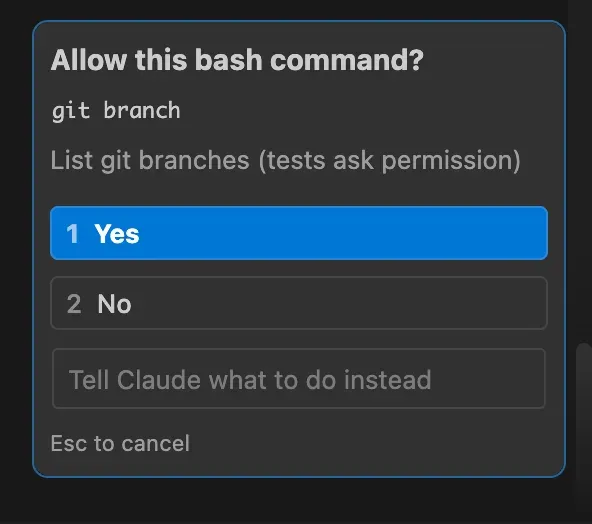
With this set up, at the moment Claude Code tries to run a target command, a confirmation prompt appears like this.
There are a few tips on the syntax.
Bash(git push:*)matches “git push + any arguments”- The bare
git pushwith no arguments isn’t caught by:*, so also include the bare formBash(git push)
As a caveat, Bash(git branch:*) matches not only branch creation but also listing like git branch -a. Since glob can’t distinguish creation from listing, there’s a trade-off where even listing becomes subject to confirmation. If it bothers you, you’ll need to either accept the confirmation or write the rules more granularly.
Implementation ②: completely forbid deletion and destruction operations (deny)
For irreversible operations, confirmation (ask) isn’t enough. It’s over the moment you carelessly wave through a confirmation prompt. Operations like these are blocked with deny.
"deny": [
  "Bash(git branch -d:*)",
  "Bash(git branch -D:*)",
  "Bash(git push --delete:*)",
  "Bash(git push -d:*)",
  "Bash(git tag -d:*)",
  "Bash(git tag --delete:*)",
  "Bash(git rm:*)",
  "Bash(git clean:*)",
  "Bash(git stash drop:*)",
  "Bash(git stash clear)",
  "Bash(git remote remove:*)",
  "Bash(git remote rm:*)",
  "Bash(git reset --hard)",
  "Bash(git reset --hard:*)",
  "Bash(git checkout --:*)",
  "Bash(git restore:*)"
]
They fall broadly into two categories.
- Deletion
- Branch deletion (git branch -d / -D), remote branch deletion (git push —delete / -d)
- Tag deletion (git tag -d), file deletion (git rm), untracked file deletion (git clean)
- Stash discard (git stash drop / clear), remote deletion (git remote remove / rm)
- Destruction
- Destruction of history and working tree (git reset —hard), discarding changes (git checkout — / git restore)
Operations put in deny can’t be run even if you confirm. When you genuinely need to run one for a legitimate purpose, a human ends up running it manually.
Summary
It can be organized as a structure that protects in two layers.
- Instructions (CLAUDE.md) = a request. Enforcement is weak, but it can convey intent and context.
- permissions = an enforced guard. It works declaratively, but there’s a limit to how exhaustively you can express things.
The guideline for where to draw the line is simple. ask is for “operations you want to confirm,” deny is for “operations you absolutely don’t want done.” After that, adjusting it to your own workflow is the way to go. You can’t aim for perfection, but you can reliably reduce the nervous moments.
Periodic housekeeping is also important. Review allow / ask / deny, and clean up rules that are no longer needed or too broad.
Finally, let me include the whole configuration bringing together the ask / deny so far.
"permissions": {
  "allow": [],
  "ask": [
    "Bash(git commit)",
    "Bash(git commit:*)",
    "Bash(git push)",
    "Bash(git push:*)",
    "Bash(git checkout -b:*)",
    "Bash(git switch -c:*)",
    "Bash(git branch:*)"
  ],
  "deny": [
    "Bash(git branch -d:*)",
    "Bash(git branch -D:*)",
    "Bash(git push --delete:*)",
    "Bash(git push -d:*)",
    "Bash(git tag -d:*)",
    "Bash(git tag --delete:*)",
    "Bash(git rm:*)",
    "Bash(git clean:*)",
    "Bash(git stash drop:*)",
    "Bash(git stash clear)",
    "Bash(git remote remove:*)",
    "Bash(git remote rm:*)",
    "Bash(git reset --hard)",
    "Bash(git reset --hard:*)",
    "Bash(git checkout --:*)",
    "Bash(git restore:*)"
  ]
}
References
 https://code.claude.com/docs/en/settings#permission-settings